Web search
CodeVista integrates Google Search capabilities to supplement the knowledge of its AI models and provide additional sources of information for users to cross-check and validate the generated responses. The Web Search feature is available in two modes: "Search After" and "Search Before".
Feature | Search Before | Search After |
|---|---|---|
Feature | Search Before | Search After |
Purpose | Augment CodeVista's knowledge with the latest information from web searches to generate a more comprehensive and up-to-date response. | Cross-check and validate the key ideas in CodeVista's response against the latest web search results. |
Trigger | Use the magic command /web-search in the prompt input box. | Click or tap the magnifying glass icon (🔎) after CodeVista generates a response. |
Process | 1. Analyze the prompt for key ideas. | 1. Summarize the key ideas from CodeVista's response |
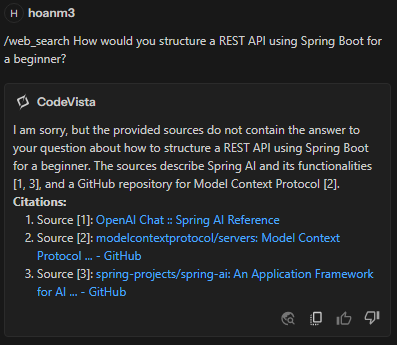
Output | A response synthesized from the information gathered from web searches, with citations. | The top 3 web search results for each query, allowing users to cross-check CodeVista's response. |
Known Limitations | Long processing time before the first streaming response. Some queries may return no search results. | Some queries may return no search results. |
Search Before
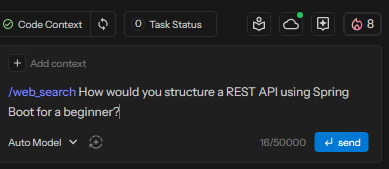
Use the action command /web_search in the prompt input box.
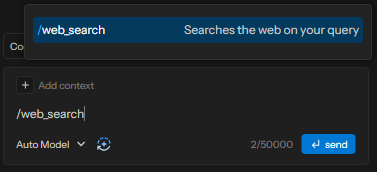
Enter the prompt you want to search for:
View the search result:
Search After
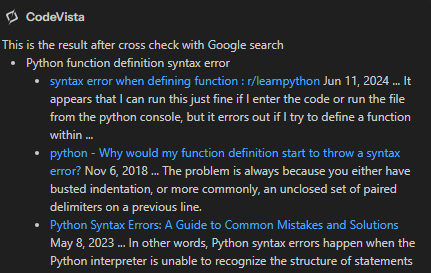
Click or tap the magnifying glass icon (🔎) after CodeVista generates a response.
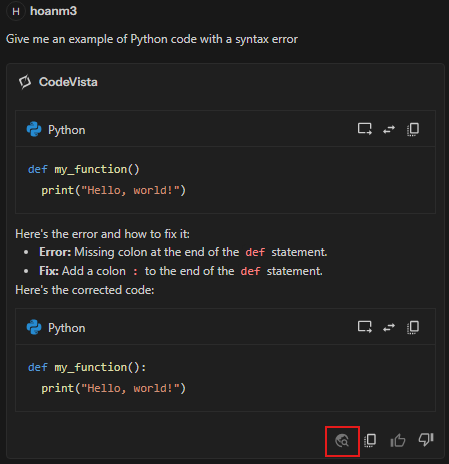
View the search result:
By using CodeVista's Web Search, you'll improve the accuracy and knowledge of AI-generated responses with the latest information from the web.