Quota Usage
The standard quotas for use of CodeVista are as follows:
| Metric | Quota | Notes |
|---|---|---|
| Requests per day | 200 | Refilled at midnight GMT +7 |
Additionally, the Prototyper Agent usage quota is divided into two categories, as follows:
| Metric | Quota | Notes |
|---|---|---|
| Monthly premium Prototyper quota (tokens) | 2000000 | Refilled at midnight GMT +7 on the first day of the month. |
| Monthly normal Prototyper quota (tokens) | 10000000 | Refilled at midnight GMT +7 on the first day of the month. |
Increasing Quotas
Quotas can be increased through a quota increase request process. Consult the appropriate documentation or contact the AIC team for more information on the quota increase request process.
Monitoring Usage
CodeVista provides usage monitoring tools to help you track your quota consumption and ensure efficient utilization of resources.
Remaining Quota
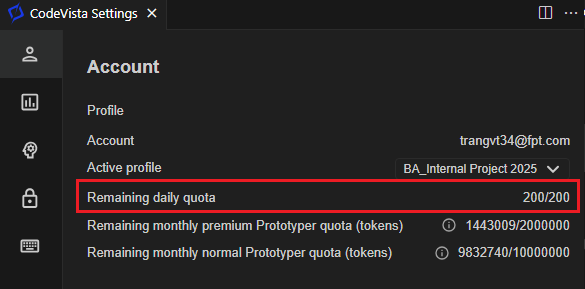
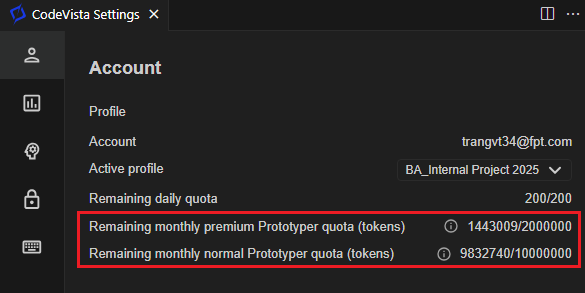
User can check their remaining daily request quota, remaining monthly Prototyper quota and the number of files you have uploaded through the user interface.
Remaining Daily Request Quota
Remaining monthly Prototyper Quota (tokens)
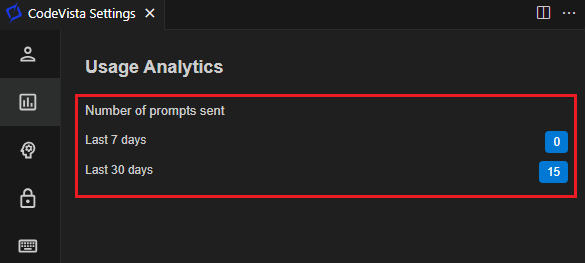
User Analytics
CodeVista also provides user with usage insights over the past 7 and 30 days.
Quota Limit Error
- If you exceed the daily request quota or the file upload limit, CodeVista will prevent you from submitting additional requests or uploading more files until the quotas are refreshed or increased.
- Attempts to exceed the quotas will result in an error message or notification, indicating that you have reached the usage limit.
Best Practices to Manage Usage
- Plan your usage carefully, considering your project requirements and the available quotas.
- Prioritize your prompts or queries to ensure that you utilize your daily request quota efficiently.
- Regularly review and clean up any unused or outdated files uploaded to CodeVista to free up space for new file uploads.
- If you anticipate needing higher quotas, submit a quota increase request in advance to avoid disruptions to your workflow.