Planner Agent
Planner Agent - an intelligent AI agent designed to help you plan and complete development tasks step by step. Simply provide a prompt, and it will automatically break down your goal into actionable steps using predefined tools, making task automation smarter and more efficient.
Step 1: Find the Planner Agent
Navigate to the top of the chat panel and click on the "Agent" tab and Planner Agent interface will be displayed as follow:
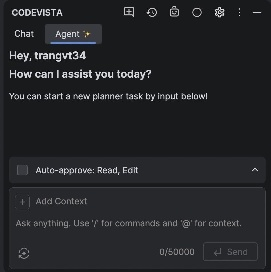
Step 2: Settings approval
By approving Planner Agent to read files & directories, edit files, and execute safe commands, Planner Agent is now authorized to:
- Read any files on your computer
- Modify any files on your computer
- Execute safe terminal commands (any commands which are determined as potentially destructive still requires user's approval).
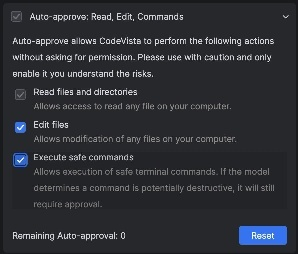
Step 3: Enter your prompt and send to Planner Agent
In the chat input, type the task you want the Planner Agent to perform. For example:
"Please create sorting function in python language"
Press Enter to send the prompt.
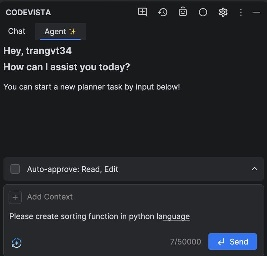
Step 4: Execute the commands generated by the Agent
Click the "Run" button within the code block to execute the script.
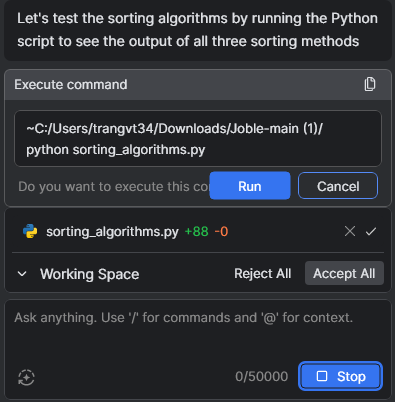
Inside Working Space, you can:
-
Review proposed changes
-
Use Accept All to apply all suggestions
-
Use Reject All to discard them
This lets you control how changes are implemented before proceeding.
After running, you will see the output of the program.
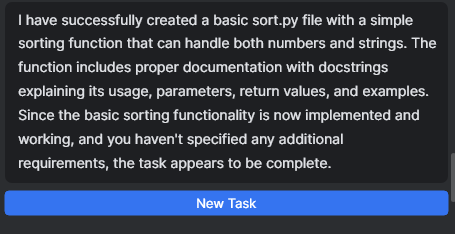
Step 5: Create a new Task
When you have done or want to begin a new task, click the "New Task" button.
You can then enter a new prompt to create a fresh task plan with Planner Agent.
With Planner Agent, developers can focus on ideas and problem-solving, while the agent handles the planning and execution, making development faster, smarter, and more structured.