What's New in CodeVista v1.6.0 for JetBrains IDE
The latest version of CodeVista is here, bringing exciting new features, performance improvements, and enhanced AI capabilities to help developers write better code faster. Here's what's new:
🧠 Advanced LLM Model Selection
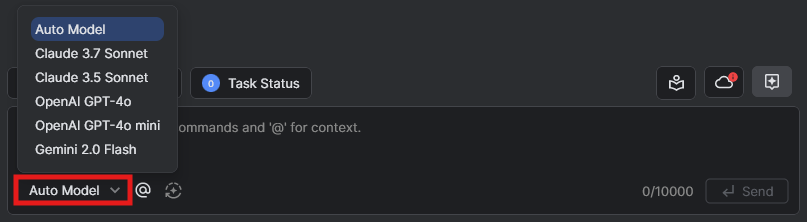
Choose from cutting-edge models:
- Claude 3.7 Sonnet (highly recommended for coding)
- Claude 3.5 Sonnet
- OpenAI GPT-4o
- OpenAI GPT-4o mini
- Gemini 2.0 Flash
By default, Auto Model option automatically picks the best one based on your query. But you can choose from a collection of other models, each with its own particular strengths.
CodeVista allows you to switch models during a chat, enabling the alternative model to generate responses to your prompts.
🌟 Revamped UI/UX
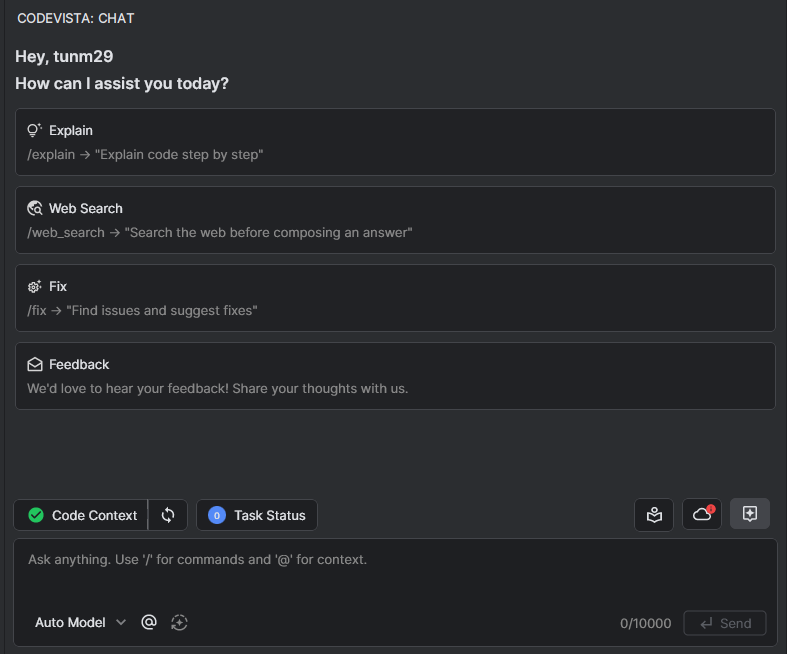
Experience a modernized and visually refined interface across Chat Conversation, Improved Prompt Feature, and the Prompt Library, designed to provide a more intuitive, user-friendly, and efficient workflow for developers of all skill levels.
⚡ Exclusive Enhancements for JetBrains
For users on JetBrains IDEs like IntelliJ and PyCharm, benefit from:
- Improved CodeVista Autocomplete when relevant files are open in the editor.
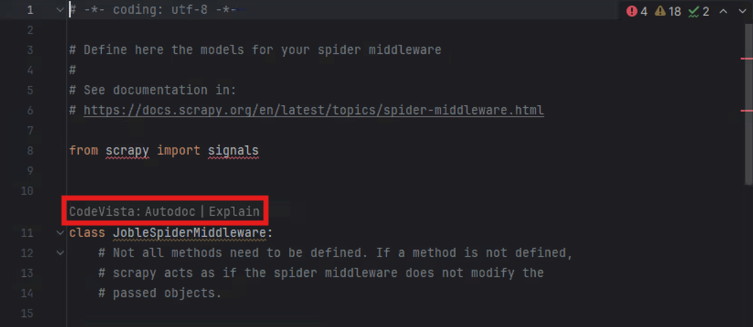
- Direct access to Autodoc and Explain features above each function for a seamless coding experience.
📢 Try It Now!
Upgrade to CodeVista Version 1.6.0 today and experience the next level of AI-powered coding assistance:
- CodeVista: AI Coding Assistant — JetBrains Marketplace
- CodeVista: AI Coding Assistant (FPT Internal) — JetBrains Marketplace
We'd love to hear your feedback—join our community and let us know what you think!
Happy coding! 🚀