What's New in CodeVista v1.4.4 for Visual Studio
The latest version of CodeVista is here, bringing exciting new features, performance improvements, and enhanced AI capabilities to help developers write better code faster.
Here's what's new:
🎛️ New Extension Settings and Hotkey Configuration
Say hello to a smarter, more organized settings experience!
In this release, we've reimagined the Extension Settings to give you greater control and clarity.
Instead of a cluttered all-in-one panel, settings are now grouped into intuitive sections—making it faster and easier to find exactly what you need.
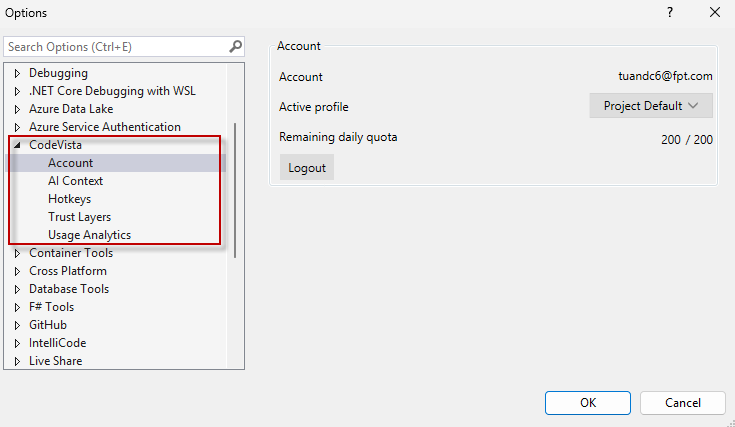
But the real game-changer? The brand-new Keyboard Shortcuts panel. You asked, we delivered.
Now you can view all available commands and their shortcuts in one place, customize keybindings to fit your coding style, and even disable or reassign keys—all with real-time conflict detection to avoid overlaps.
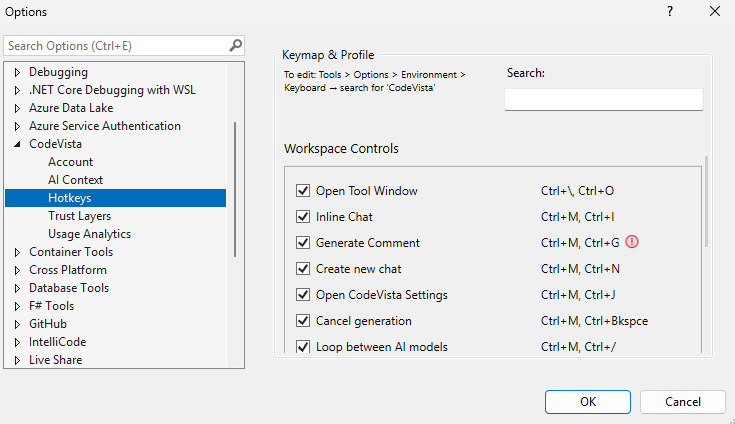
Whether you're streamlining your workflow or reclaiming your favorite shortcuts, it's never been easier to make the extension truly yours.
Your tools should work the way you do—and with this update, they finally do.